How GPT-5.2 Performs on Real World Documents?

Snehasish Konger
Founder & CEO
Technical

Request an AI summary of this page
GPT-5.2 represents OpenAI's latest advancement in multimodal understanding, with enhanced vision capabilities and improved structured output generation. The question engineering teams face isn't whether GPT-5.2 is powerful—it clearly is—but rather: when should we use it directly for document processing versus building specialized pipelines?
For teams dealing with straightforward, clean documents who can tolerate occasional errors and aren't operating under strict latency requirements, GPT-5.2 can be an elegant solution. However, most production environments don't fit this profile.
We conducted extensive testing to understand where GPT-5.2 excels and where it struggles with real-world document processing. The results reveal important patterns about deploying LLMs for mission-critical document extraction.
Testing Approach
Our evaluation followed a standardized methodology:
Direct API access to GPT-5.2 with vision capabilities enabled
Maximum reasoning tokens allocated for complex documents
Standard extraction prompts requesting structured JSON output
Documents sourced from actual production workflows in healthcare, finance, and logistics
Test Case 1: Handwritten Forms
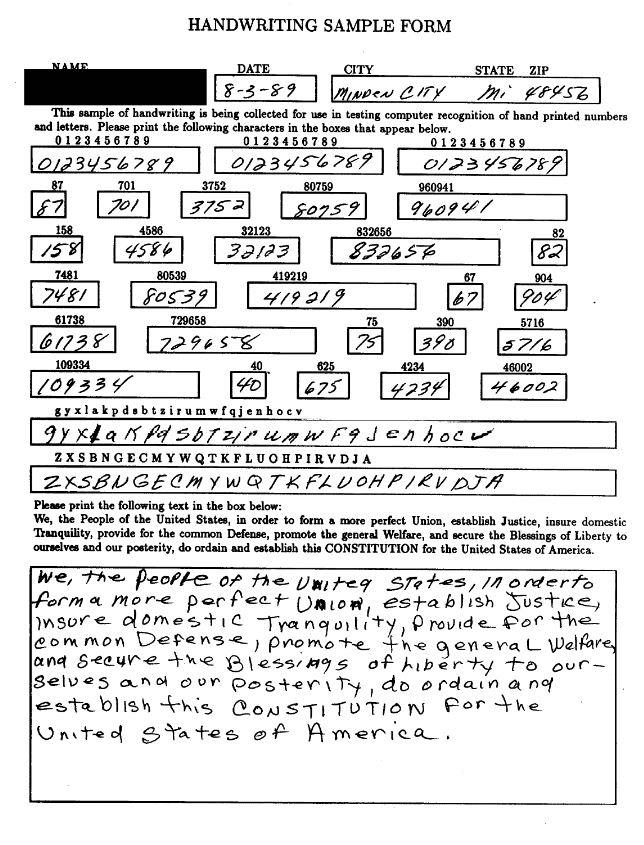
Handwritten documents remain one of the most challenging categories for automated processing, yet they're everywhere—patient intake forms, delivery receipts, field inspection reports.
We tested GPT-5.2 on a handwritten insurance claim form with mixed print and cursive handwriting. While the model successfully extracted most printed fields, it struggled significantly with cursive signatures and handwritten dollar amounts.
Key findings:
Misread handwritten "7" as "1" in a claim amount field ($7,450 interpreted as $1,450)
Failed to extract signature names entirely, returning empty fields
Processing time: 45 seconds for a single-page form
Accuracy on handwritten fields: approximately 68%
For use cases where handwriting appears frequently—healthcare intake, logistics documentation, legal forms—this accuracy gap creates substantial downstream risk. A single digit error in financial amounts can cascade through accounting systems.
Also read: How to extract data from PDF with AI
Test Case 2: Dense Tabular Data
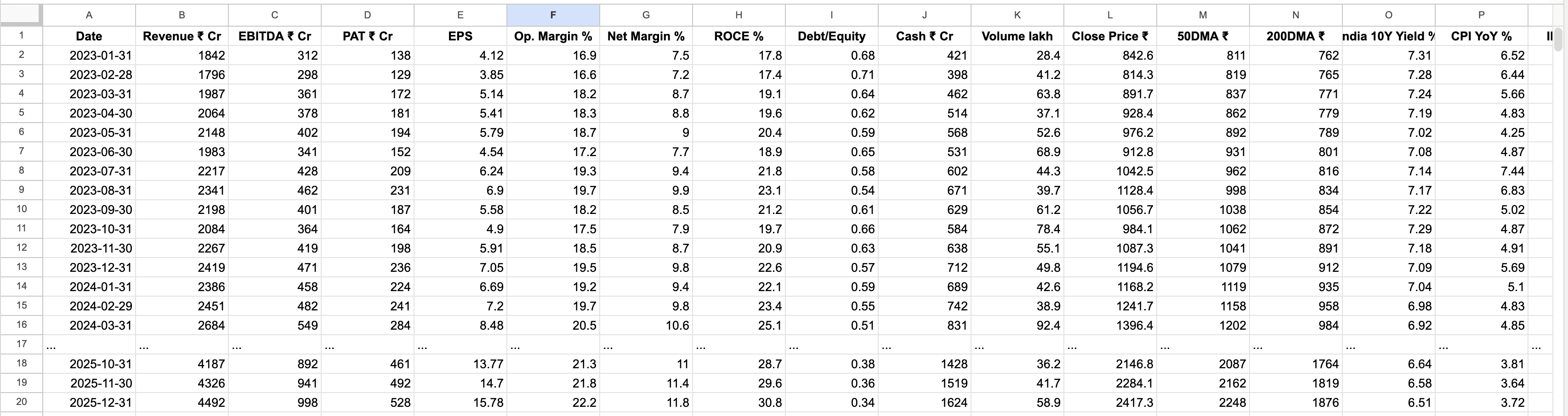
Financial statements, inventory spreadsheets, and compliance reports often contain dense tables spanning multiple pages. We tested GPT-5.2 on a 15-page accounts payable report with 200+ line items.
The model performed admirably on the first three pages, accurately extracting vendor names, invoice numbers, and amounts. However, performance degraded noticeably after page 8.
Observed issues:
Skipped rows appeared intermittently after page 8 (12 rows completely dropped)
Column alignment errors where values shifted to adjacent cells
Inconsistent number formatting (some amounts lost decimal precision)
Total processing time: 8 minutes 42 seconds
When we ran the same document through the pipeline three times, we got slightly different results each time—a sign that the model's attention mechanisms aren't perfectly stable across long sequences. For financial reconciliation workflows, this inconsistency is problematic.
Test Case 3: Degraded Document Quality
Real-world documents rarely arrive in pristine condition. Fax machines, poor scanning practices, and age create visual noise that challenges OCR systems.
We tested a heavily degraded utility bill with the following characteristics:
150 DPI scan quality (significantly below modern standards)
15-degree rotation skew
Coffee stain covering approximately 20% of the document
Faded text in multiple sections
Results:
Successfully extracted account number and service address
Completely missed usage data table obscured by the stain
Misread several digits in the total amount due
Hallucinated a late fee that wasn't present (likely pattern-matching from similar documents)
Processing time: 2 minutes 18 seconds
The hallucination is particularly concerning. GPT-5.2's training on countless utility bills means it "knows" what should appear, sometimes filling in expected fields even when they're not visible in the actual document. This behavior is valuable for general reasoning but dangerous for precise data extraction.
Test Case 4: Mixed-Language Documents
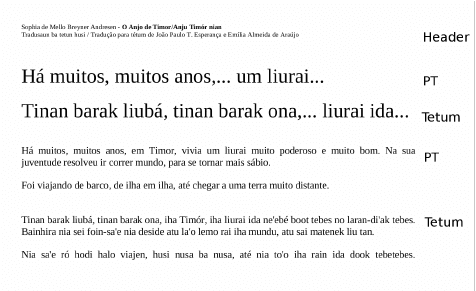
Global businesses routinely process documents in multiple languages, sometimes within the same file. We evaluated GPT-5.2 on a trilingual shipping manifest containing English, Spanish, and Vietnamese.
The model handled English and Spanish sections excellently, with near-perfect extraction. Vietnamese content proved more challenging.
Language-specific performance:
English sections: 97% accuracy
Spanish sections: 95% accuracy
Vietnamese sections: 78% accuracy
Processing time: 1 minute 52 seconds
Interestingly, the model occasionally mixed languages in its output, returning Spanish translations for Vietnamese fields. This suggests the model's internal representations don't maintain strict language boundaries when under cognitive load.
Test Case 5: Complex Document Layouts
Modern documents often use sophisticated layouts—multi-column formats, text wrapping around images, sidebars, and annotations. We tested GPT-5.2 on a research report with a complex three-column layout, embedded charts, and footnotes.
Layout comprehension issues:
Incorrectly merged text across columns, disrupting reading order
Lost footnote associations (footnotes appeared as disconnected fragments)
Failed to maintain hierarchy in nested bullet points
Chart data extraction was incomplete and occasionally inaccurate
Processing time: 3 minutes 8 seconds
The reading order problem is subtle but significant. When extracting contract clauses or legal documents, preserving the exact sequence is often legally important. GPT-5.2's vision model sometimes makes logical inferences about reading order that differ from the intended flow.
Test Case 6: Form Fields and Checkboxes
Structured forms with checkboxes, radio buttons, and form fields represent a specific challenge category. We tested a medical referral form with 18 checkbox fields indicating patient symptoms.
Checkbox detection results:
Detected 11 out of 18 checked boxes
2 false positives (identified unchecked boxes as checked)
Completely missed checkboxes in the footer section
Text field extraction: 92% accurate
Processing time: 58 seconds
The checkbox miss rate is concerning for healthcare and compliance applications where every selection carries meaning. In this case, missing checked symptoms could affect diagnosis and treatment decisions.
Practical Implications for Engineering Teams
Our testing reveals that GPT-5.2's capabilities are genuinely impressive, but the model wasn't optimized specifically for document processing production requirements. Here's what this means:
When GPT-5.2 works well:
Clean, well-formatted documents with good scan quality
Text-heavy documents without complex tabular structures
Scenarios where 90-95% accuracy meets business requirements
Exploratory projects or low-stakes automation
Processing volumes under 1,000 documents per day
When you'll likely need more:
Financial documents where every digit matters
Healthcare records with compliance implications
High-volume processing requiring sub-second latency
Documents with frequent handwriting, checkboxes, or complex layouts
Workflows requiring 99%+ accuracy
Multi-page tables and arrays that must maintain perfect integrity
Architecture Considerations
Most production document processing systems treat GPT-5.2 as one component rather than the entire solution. Common patterns include:
Specialized OCR + GPT-5.2 for understanding: Traditional OCR engines extract raw text with high fidelity, then GPT-5.2 provides semantic understanding and field mapping.
GPT-5.2 for initial extraction + validation layer: The model handles extraction, but outputs flow through rule-based validators or human-in-the-loop review for high-stakes fields.
Hybrid routing: Simple documents go directly to GPT-5.2; complex or degraded documents route through specialized processing pipelines.
Fine-tuned vision models for specific domains: Healthcare forms, financial statements, or logistics documents might benefit from domain-specific models trained on representative data.
Read more: What is IDP?
Cost Considerations
Beyond accuracy, cost matters. At current API pricing, processing a 10-page document through GPT-5.2 with vision costs approximately $0.15-0.25 depending on token usage. For high-volume workflows processing 10,000+ documents daily, this translates to $1,500-2,500 per day—$45,000-75,000 monthly.
Traditional OCR solutions often run at fraction of this cost, though they lack GPT-5.2's reasoning capabilities. The economic equation depends heavily on:
Error correction costs downstream
Processing volume
Latency requirements
Human review requirements
The Bottom Line
GPT-5.2 represents remarkable progress in multimodal AI and can absolutely serve document processing needs—but with clear boundaries. It excels at understanding document semantics, handling varied formats, and extracting structured data from clean sources.
However, production document processing demands pixel-perfect accuracy, consistent output, and reliable handling of edge cases that appear routinely in real workflows. The model's occasional hallucinations, instability across long documents, and challenges with degraded quality or handwriting create meaningful risk in high-stakes applications.
The most successful implementations we've observed treat GPT-5.2 as an intelligent component within a broader architecture—leveraging its reasoning while compensating for its limitations through complementary technologies and validation layers.
Document processing isn't just about extracting text; it's about establishing a foundation of data integrity that every downstream system depends on. In that context, understanding exactly where GPT-5.2 shines and where it struggles isn't just useful—it's essential.
For teams building document processing pipelines, the question isn't whether to use AI, but how to architect solutions that balance innovation with reliability. The answer usually involves more than a single model, no matter how capable.